Your Work Hub: Text Expander, Notes & Links
inside any tab.
NexoPad is a productivity extension for Chrome, Edge, Firefox, Opera and Brave that brings together a text expander, snippets, notes, links, captures and contextual AI for Gmail, LinkedIn, WhatsApp, Zendesk and any browser tab.
Free plan available · No credit card required
SNIPPETS
compatible with thousands of websites and web apps
0%
Less repetitive work
0k+
Automated actions
0+
Key integrations
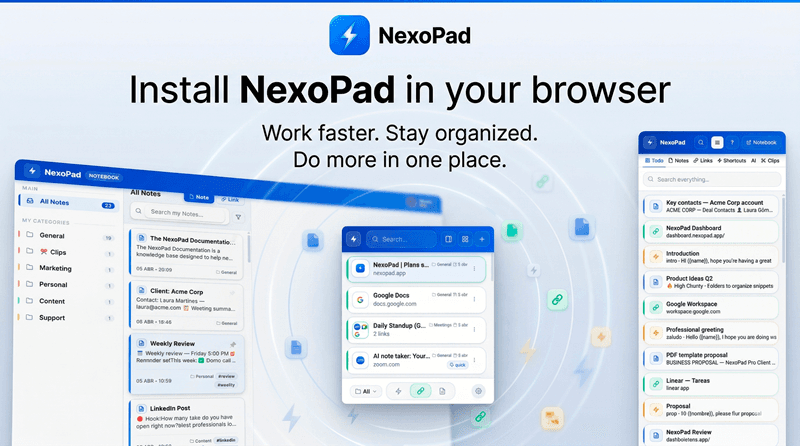


Productivity extension for Chrome, Edge, and Firefox.
NexoPad lives inside the browser and adapts to Gmail, LinkedIn, WhatsApp, Zendesk, and most modern web apps. Install it and use it in seconds right where you already work.
Your entire ecosystem,
in a single panel.
Forget about having 50 open tabs. The NexoPad extension lives in your browser and groups your shortcuts, secret notes, and critical links just a click away.
Expand texts instantly.
Type a short command like "/proposal" and NexoPad will inject the full template into Gmail, LinkedIn, or Zendesk without opening other windows.
I've attached our VIP commercial proposal. It includes the agreed discounts. Let me know.
Start fast. Scale when you need to.
1. Install and sign in
Add the extension, sign in, and activate your personal workspace in seconds.
2. Save what repeats
Turn replies, notes, links, variables, or captures into reusable assets.
3. Use it where you work
Use NexoPad from the popup, side panel, shortcuts, or contextual AI inside the pages where you already work. If you later need more organization or collaboration, you expand on the same foundation.
Text Shortcuts & Dynamic Snippets
Write in seconds what used to take minutes. Expand templates, support replies, and emails in any text box on the web.
Para: Carlos Mendez
Asunto: Propuesta comercial Q1
Ideas para el sprint
Probar nueva API, revisar mockups...
Artículo: IA y trabajo
Los equipos que usan IA ahorran 40%...
Secure Notes & Floating Post-its
Save any content you need close by: ideas, work drafts, references, or reminders. Copy them with a single click without losing focus.
Link Manager & Team Folders
Save any link you use frequently and open it instantly from any tab. No searching through bookmarks, no wasted time.
From solo work
to coordinated teams.
Freelancers, sales, support, recruiting, engineering, and operations all fit inside the same system. NexoPad adapts to how you work today and scales with you when you grow.
Automate the repetitive.
Stop typing the same thing over and over. With NexoPad, your best responses are always one command away.
Time Saved (Month)
Share only when it matters.
Work from your personal vault or sync resources with others when consistency, onboarding, or control becomes important.
Your privacy, first.
Your data never leaves your device without your permission. Local end-to-end encryption.
Dynamic variables.
Personalize every message with dynamic fields. NexoPad prompts you for the data before expanding.
Want to explore all features in detail?
See all featuresThe extension is the core.
The web editor adds control.
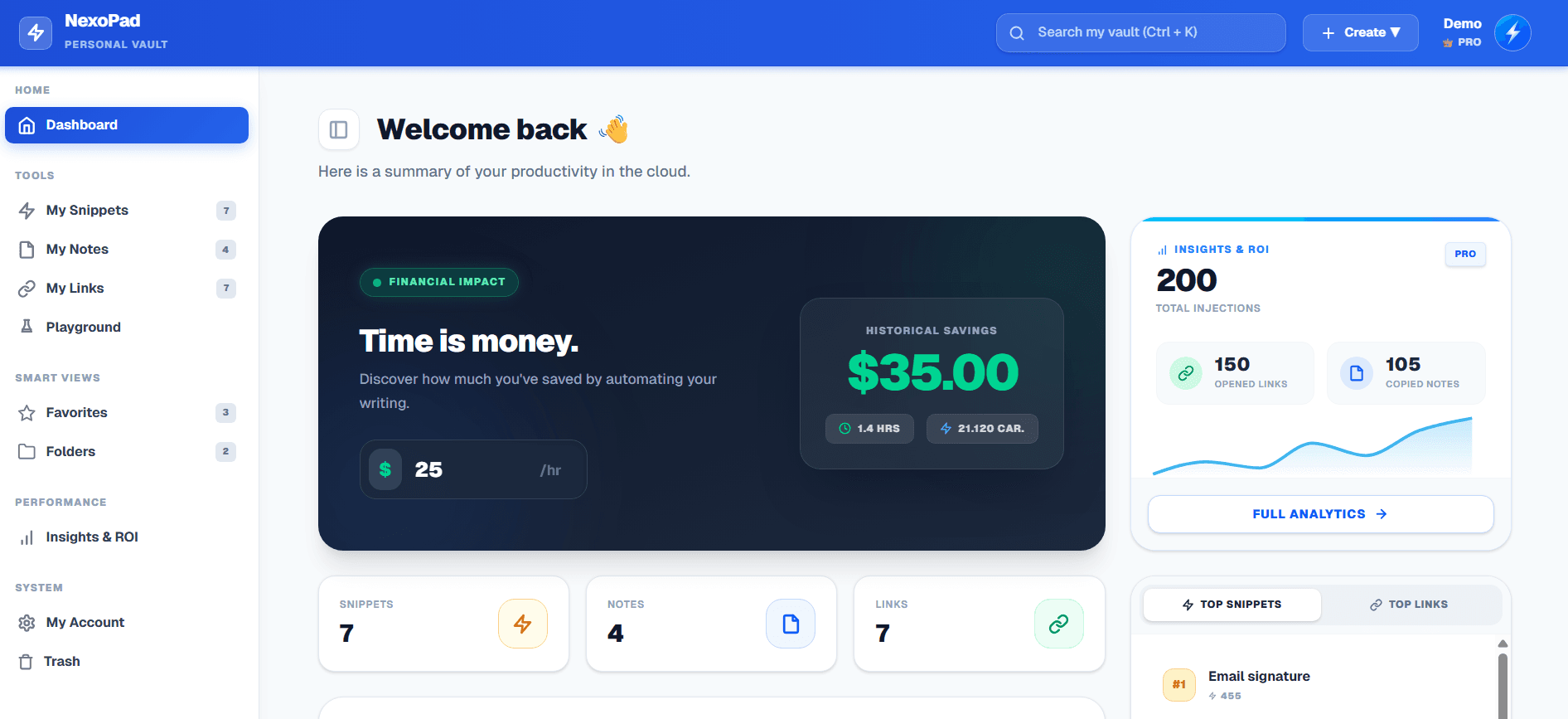
If you ever need more organization, NexoPad's web editor adds folders, search, favorites, security, and account controls without forcing you to change your system. Teams comes later, only when collaboration truly asks for it.
Free to start · No tool switching
From freelancers to teams, nobody wants to go back to chaos.
"NexoPad changed the way I work. I save at least 2 hours a day on repetitive replies."
Andrea Gómez
Account Executive · Salesforce
"My API keys and login details always at hand. No more searching in Notion or old emails."
Carlos Muñoz
Backend Developer · Startup
"The support team adopted NexoPad in a week. Responses are faster and more consistent."
Mariana López
Customer Success Manager
"Integrates with everything: Gmail, LinkedIn, Zendesk. It's literally magic for sales teams."
Felipe Ríos
Sales Manager · B2B SaaS
"The command palette is incredibly fast. I open NexoPad more than any other tool."
Valentina Cruz
Ops & Automation Lead
"NexoPad changed the way I work. I save at least 2 hours a day on repetitive replies."
Andrea Gómez
Account Executive · Salesforce
"My API keys and login details always at hand. No more searching in Notion or old emails."
Carlos Muñoz
Backend Developer · Startup
"The support team adopted NexoPad in a week. Responses are faster and more consistent."
Mariana López
Customer Success Manager
"Integrates with everything: Gmail, LinkedIn, Zendesk. It's literally magic for sales teams."
Felipe Ríos
Sales Manager · B2B SaaS
"The command palette is incredibly fast. I open NexoPad more than any other tool."
Valentina Cruz
Ops & Automation Lead
"My code snippets and terminal commands are always available. A must for devs."
Diego Herrera
Full Stack Developer
"We use team vaults for onboarding. New hires are ready in minutes, not days."
Sofía Mendoza
HR & People Manager
"The best productivity product I've tried in years. Simple, fast, powerful."
Tomás Vargas
Product Manager · Fintech
"My Calendly links, proposals, and follow-ups are always ready. I close more deals in less time."
Luciana Pérez
Freelance Consultant
"The design team loves it. Figma links, assets, brand guides: all in one click."
Sebastián Torres
Creative Director · Agency
"My code snippets and terminal commands are always available. A must for devs."
Diego Herrera
Full Stack Developer
"We use team vaults for onboarding. New hires are ready in minutes, not days."
Sofía Mendoza
HR & People Manager
"The best productivity product I've tried in years. Simple, fast, powerful."
Tomás Vargas
Product Manager · Fintech
"My Calendly links, proposals, and follow-ups are always ready. I close more deals in less time."
Luciana Pérez
Freelance Consultant
"The design team loves it. Figma links, assets, brand guides: all in one click."
Sebastián Torres
Creative Director · Agency
Useful for one person.
Ready to grow with you.
NexoPad removes repetitive work for freelancers, operators, sales, support, recruiting, engineering, and also teams that later need shared control.
An extension that stays in flow
Popup, side panel, quick search, and contextual actions keep your resources available without leaving the page.
More order when you need it
If you ever need more control, the web editor helps you classify, search, recover, and manage content without rebuilding your system.
Contextual Multi-Model AI (BYOK)
Rewrite, summarize, translate, and transform content from selections, content actions, or the side panel.
Teams when you need them
Roles, approvals, and shared workspaces for the moment you move from personal flow to coordinated operations.
Scales from free
Start solo, validate the workflow, and level up when you need more collaboration, governance, or volume.
Multi-browser and multi-format
One system for snippets, notes, links, variables, and captures across the browsers your team already uses.
Works where you work.
Snippets for Gmail, LinkedIn, and WhatsApp.
Native integration.
NexoPad integrates natively with all the platforms you already use. No complex setups.
10k+
supported sites
100%
zero setup
1 click
to install
Have questions?
We have answers.
No. NexoPad is available for Chrome, Firefox, Edge, Opera, Brave, and other browsers compatible with Chrome-style extensions.
Start free and build your workflow.
Use NexoPad as your personal extension today. When your workflow grows, you can add the web editor or collaboration without starting over.
Install for freeFree plan · No credit card required · Install in 30 seconds